Start with the shareware episode
Open Play Shareware, choose the available campaign or map and let the project load its game data. Episode 1, Dimension of the Doomed, is supplied by NetQuake.io; no retail upload is needed for this starting mode.
Play Quake’s shareware first episode through NetQuake.io, an independent JavaScript browser port. Bring your own pak1.pak for registered episodes and multiplayer.
ORIGINAL GAME
Quake · id Software · 22 June 1996
BROWSER PROJECT
NetQuake.io · WebQuake-derived engine port
RENDERER
JavaScript · WebGPU / WebGL2 fallback
GAME DATA
Shareware Episode 1 bundled; owned pak1.pak for more
Game buttons open NetQuake.io in a new tab. Shareware Episode 1 is included; registered episodes and multiplayer need your own pak1.pak.
Quake is id Software’s 1996 dark fantasy FPS: explore hostile bases and gothic castles as Ranger, collect weapons and uncover secrets. NetQuake.io is an independent, open-source browser adaptation of the original game, built from the WebQuake / GLQuake lineage. Its supplied shareware data lets you start Episode 1 without uploading retail files. The enhanced commercial release is a separate product.
Open Play Shareware, choose the available campaign or map and let the project load its game data. Episode 1, Dimension of the Doomed, is supplied by NetQuake.io; no retail upload is needed for this starting mode.
Click inside the game to focus its canvas. If prompted, allow pointer lock so the mouse controls your view. Press Escape to release the pointer or return to the menu; select the game again to resume.
For Episodes 2–4, multiplayer or custom maps, use Import Game Files and provide pak1.pak from your own original Quake installation. Follow the project’s package instructions and refresh the page after import. Retail data is never uploaded to InBrowserGames.
These inputs describe the linked project or original game. Follow the platform-specific notes and the primary documentation before starting.
| ACTION | INPUT | NOTES |
|---|---|---|
| Move / strafe | W A S D | Upstream default movement bindings; arrow keys are also configured. |
| Look / fire | Mouse / Left click | Click the game canvas for mouse capture. Mouse-look can be configured in Setup. |
| Jump | Space / Right click | Both keys are assigned to jump in the project’s base configuration. |
| Select weapon | 1–8 | Weapons must have been collected and have ammunition. |
| Scoreboard | Tab | Hold to show scores. |
| Menu / console | Esc / ` or ~ | Escape opens the menu; backtick or tilde toggles the console. Browser shortcuts can take priority. |
The project’s engine runs in the browser. Its README credits Triang3l’s JavaScript WebQuake port of GLQuake, with a Vue frontend and Node.js server components. The current renderer prefers WebGPU when available and falls back to WebGL2; this is not an Emscripten build.
NetQuake.io supplies pak0.pak for the shareware episode. Its FAQ requires a legitimately owned pak1.pak for the registered episodes and multiplayer. Purchasing Quake does not mean a browser upload has already been configured; use the project’s package importer.
The upstream FAQ recommends a hardware-accelerated Chromium browser and a keyboard and mouse. Other desktop browsers may work, but mobile and touch support are limited. No per-device compatibility or performance benchmark has been completed here.
id Software released Quake engine source under the GPL while retaining the game-data copyright. NetQuake.io is a third-party project, not an official Bethesda browser edition. This directory links to the project and the commercial game; it does not distribute PAK files.
HTTP OBSERVATION
reachable · 200
2026-10-17 08:20:14 UTC
PROBE DURATION
812 ms
Page request time, not gameplay latency.
BROWSER GAMEPLAY CHECK
Not completed
Review: candidate
HTTP reachability does not verify rendering, controls, audio or multiplayer. Refresh reads the published snapshot; it does not run a new game test.
| CHECKED AT | STATUS | PROBE DURATION | NOTES |
|---|---|---|---|
| 2026-10-17 08:20:14.580 UTC | reachable · 200 | 812 ms | HTTP 200 OK, expected marker verified |
Recorded HTTP responses and page markers. Game performance may differ.
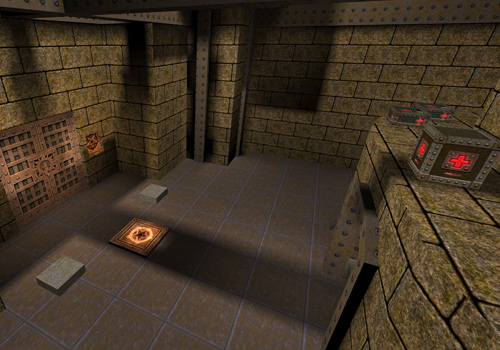
Quake images © id Software / Bethesda Softworks. Map previews are hosted by QuakeOne and referenced by NetQuake.io; these are reference images, not captures of a verified browser session.
Enable browser hardware acceleration, update the browser and graphics driver, then retry in a current desktop Chromium browser. Check the project FAQ if WebGPU or WebGL2 is unavailable. An HTTP 200 result only confirms the page response, not rendering success.
Click inside the game first and check pointer-lock permissions. Open Controls to review the bindings; the Autoexec tab can persist +mlook. Escape releases mouse capture, so refocus the canvas before continuing.
Check whether the project has your registered pak1.pak. Shareware is limited to Episode 1. Import files from your owned original installation using the Packages tab and follow the project’s refresh instructions.
The multiplayer screen lists project-supported servers. Server availability and network restrictions can differ from the website’s recorded HTTP status. Try another listed server and consult the upstream FAQ; this directory does not operate those servers.
NetQuake.io includes the shareware first episode. The remaining registered content and multiplayer require your own pak1.pak according to the project FAQ. Use the commercial store link if you need an original copy.
No. The browser project follows the original Quake / WebQuake engine lineage. The Steam product includes Original and Enhanced editions, but its enhanced features and console crossplay are not features we claim for NetQuake.io.
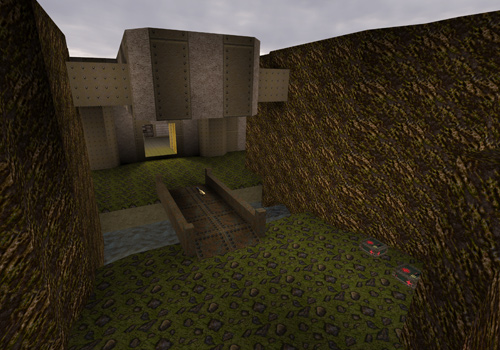
The cover is official Quake title artwork from the commercial store. The two gameplay-area images are classic-map previews hosted by QuakeOne and selected by NetQuake.io. They illustrate the maps; they are not evidence of a completed browser playthrough.
No. It records a response and expected page identity at the displayed time. Browser rendering, audio, controls, imported files and multiplayer gameplay need separate verification. This project remains a candidate until those checks are recorded.
Editorial review: 2026-10-17 10:32:17 UTC · This date records source research, not a gameplay test.